

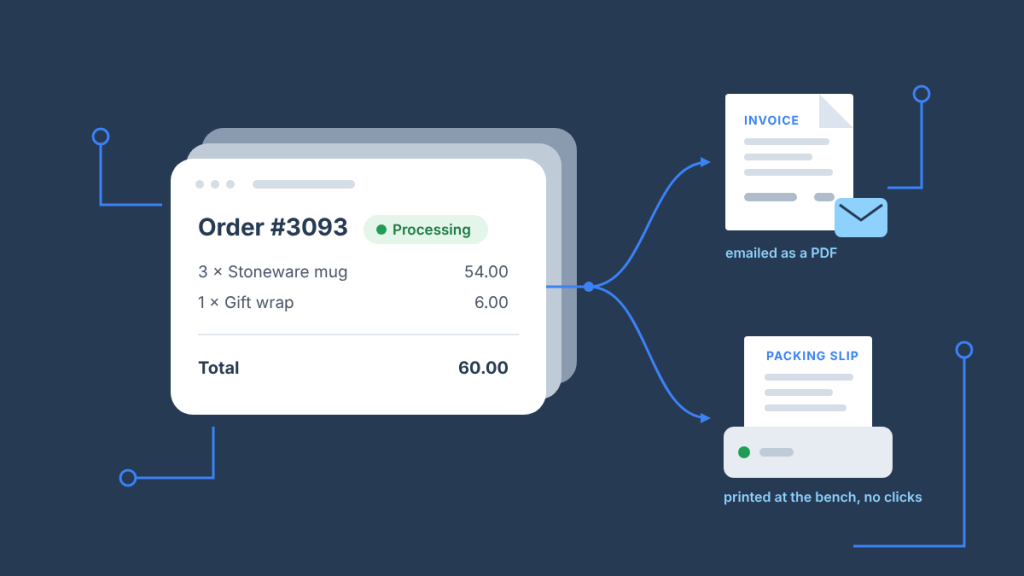
Last updated November 2026
The best WooCommerce packing slip plugin depends on one question: do you need PDFs that get emailed, or paper that prints itself? For PDFs, PDF Invoices & Packing Slips for WooCommerce by WP Overnight is the best-in-class choice and the free version covers most stores. For paper that prints automatically when an order is paid, with no one clicking Print, you need a cloud-printing plugin such as BizPrint Print Manager for WooCommerce, and many stores run one of each. This guide compares seven WooCommerce packing slip and invoice plugins on what they generate, what they automate and what they cost, with every price checked on the vendor’s own page in November 2026, then shows how to pair a PDF plugin with automatic printing and when you need no plugin at all.
Key Takeaways
- “Packing slip plugin” means two different products. PDF plugins generate documents and attach them to emails; print plugins send paper to a printer the moment an order changes status. Pick by the job, not by the feature list.
- For PDF invoices and packing slips, WP Overnight’s plugin is the standard. It is free, maintained, attaches a PDF or XML invoice to order emails, and generates packing slips in bulk; paid extensions add proforma invoices, credit notes and cloud backup.
- For automatic printing, BizPrint is the only option in this list that prints without a browser. Orders print to any connected printer on a status trigger, and the plugin is included from the Plus plan with 25 free print jobs to test it.
- A PDF plugin and a print plugin are complementary, not competing. The common setup is WP Overnight for the customer’s emailed invoice and BizPrint for the packing slip at the bench; neither replaces the other.
- WooCommerce still has no built-in packing slip or invoice. Since version 8.7 core can render a receipt for the mobile apps and the REST API, and any order page can be printed from the browser, but a document with your logo, numbering and line items needs a plugin.
- Prices change; the dates in the table don’t. Every figure below was read from the vendor’s page on 13 November 2026, and most paid plugins are annual licences for one site.
Which WooCommerce packing slip and invoice plugin should you choose?
Choose by what the document has to do, because every plugin in this comparison is good at one job and ordinary at the others. The table maps the common needs to the plugin that handles each one best; the per-plugin sections below explain why.
| You need | Best fit | Why |
|---|---|---|
| A PDF invoice attached to the order email, free | PDF Invoices & Packing Slips for WooCommerce (WP Overnight) | Attaches a PDF or XML invoice to the emails you choose, sequential numbering, bulk packing slips, 300,000+ active installs |
| Packing slips and pick lists printed from the Orders page, with a print-status filter | WooCommerce Print Invoices & Packing Lists (SkyVerge) | Category-sorted pick lists across orders, Customizer live preview, filter by printed / not printed |
| Invoices, packing slips, delivery notes, dispatch and shipping labels in one free plugin | WebToffee PDF Invoices, Packing Slips, Delivery Notes & Shipping Labels | Five document types free, bulk download and print, PrintNode integration in the paid version |
| Credit notes, proforma invoices and automatic Dropbox or Google Drive backup | YITH WooCommerce PDF Invoices & Packing Slips | Nine templates plus a block-based builder, automatic generation on a chosen status |
| E-invoicing formats (ZATCA, GST) and multilingual invoices | Challan (WebAppick) | Free automatic PDF attachment; Pro adds ZATCA, GST, WPML/Polylang/Weglot language handling |
| A drag-and-drop template designer at the lowest paid price | WooCommerce PDF Invoices and Packing Slips (Acowebs) | Free core, Pro from $49/year with a drag-and-drop customizer for invoices, packing slips and labels |
| Paper that prints itself when an order is paid, at one or several printers | BizPrint Print Manager for WooCommerce | Automatic printing on order status, routing by product category or shipping method, any printer on Windows, macOS, Linux, Raspberry Pi or Android |
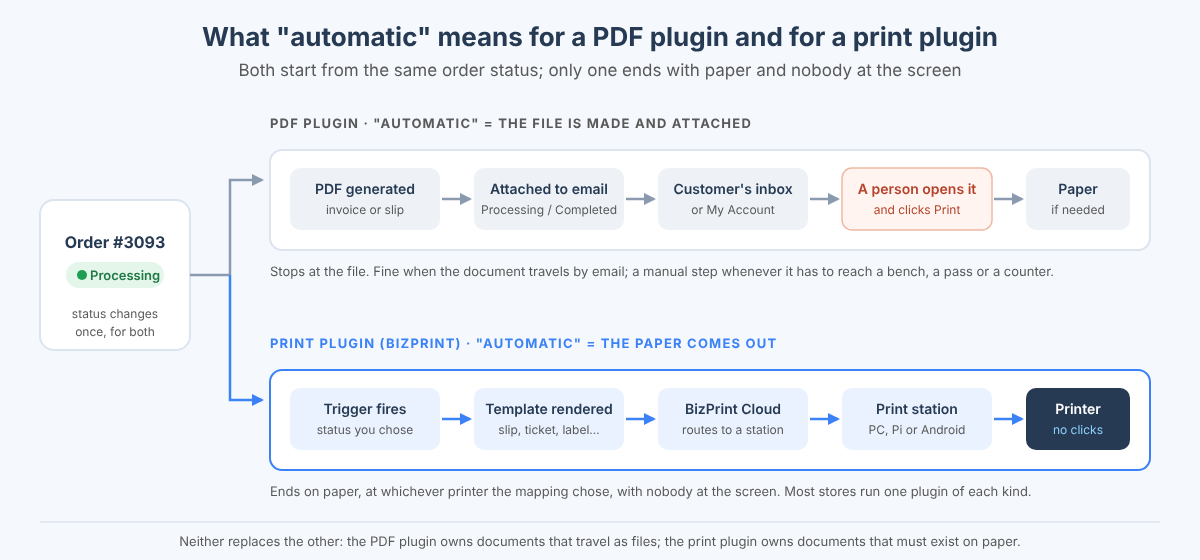
If your fulfillment is “pack orders in a batch from a screen once a day”, a PDF plugin is enough. If paper has to be waiting at the bench, the kitchen pass or the pickup counter before anyone looks at the admin, you need automatic printing, and the complete guide to automatically printing WooCommerce orders covers that system end to end.
Is a packing slip considered an invoice?
No: a packing slip is an operational document that lists what is in the box, and an invoice is a financial document that records the sale and requests or confirms payment. In the WooCommerce fulfillment process they serve distinct but complementary functions, and most of the plugins below generate both from the same order, which is why the two are usually bought together.
- Function: packing lists are operational tools that help warehouse staff gather orders, often organised by product category to reduce picking time and errors; invoices establish the seller’s right to payment and serve as official transaction records for accounting and tax purposes.
- Content: a packing slip lists items by product category, includes weights and dimensions where useful, and usually omits pricing; an invoice carries a unique invoice number, clearly stated totals, tax and payment terms, formatted professionally.
- Compliance: invoices are not technically legal documents, but those tied to contracts may be legally enforceable, and for international shipments a commercial invoice must comply with country-specific customs regulations to avoid clearance delays.
- Customer experience: including a packing slip lets customers verify received items against their purchase, which builds trust and reduces disputes; both documents are a branding surface for your logo, policies and a short message.
- Integration: modern invoice and packing list systems feed CRM, ERP, inventory and accounting software, so the plugin you choose should at least export cleanly or attach to the order record.
The short version lives in our packing slip vs invoice explainer; for the picking side specifically, see how to create and automatically print WooCommerce pick lists.
What should you look for in a WooCommerce packing slip plugin?
Look for the five things that decide whether a packing slip plugin still fits a year from now: bulk generation, automatic printing, template control, document coverage and how it fits your workflow. Everything else on a feature list is detail.
- Bulk printing. The most essential feature for busy stores is bulk printing: select multiple orders at once and print or download all their packing slips in a single batch. The best solutions let you filter orders by date, status or print state before bulk printing, making it easy to handle daily fulfillment batches.
- Automatic printing. Some plugins offer automatic printing, where packing slips are sent directly to designated printers when orders reach specific statuses (like Processing or a custom status). This hands-off approach removes the need to trigger print jobs manually, and it is the single feature that separates the two halves of this list.
- Template customisation. Since your packing slips represent your brand to customers, it is worth opting for a plugin that offers template customisation options so you can add your logo, adjust layouts and control exactly what information appears on the document. Check whether that happens in a visual editor, in the WordPress Customizer with a live preview, or by editing HTML and CSS.
- Multiple document types. Packing slips are a big part of your fulfillment process, but you will probably need other documents as well: invoices, shipping labels, delivery notes, credit notes, return forms. A single plugin that handles all of them creates a more cohesive workflow than three plugins that each do one.
- Workflow fit. Consider how the plugin fits into your existing processes. Does it work with your shipping software? Can it handle your order volume without slowing the Orders screen? Does it integrate with the printers and stations you already own? The best solutions offer integration points with the rest of your stack and scale as the business grows.
Two smaller criteria matter for specific stores. Stores selling bundles or variable products should check how the plugin displays bundled items (parent, children or both) and variation attributes. Stores with multiple fulfillment locations should check whether the plugin can produce a separate packing slip per location, or route each slip to the printer at that location, rather than one slip for the whole order.
How do the best WooCommerce packing slip and invoice plugins compare?
Six of the seven plugins generate PDFs and rely on a person or an email to move them; one prints paper automatically. The table shows the free tier, the paid price for one site, the document types and the automation each offers, with prices read from each vendor’s page on 13 November 2026.
| Plugin | Free version | Paid price (1 site, checked 2026-11-13) | Documents | PDF / paper | Automatic | Templates |
|---|---|---|---|---|---|---|
| PDF Invoices & Packing Slips for WooCommerce (WP Overnight) | Yes, 300,000+ active installs | Professional extension from €69/year; Automatic Order Printing (PrintNode) extension sold separately | Invoice (PDF, UBL/XML e-invoice), packing slip; Pro adds proforma, credit note, receipt | PDF; paper only via the PrintNode extension | PDF attached to chosen emails automatically | HTML/CSS templates, premium template pack |
| WooCommerce Print Invoices & Packing Lists (SkyVerge, Woo Marketplace) | No | $79/year | Invoice, packing list, pick list | Browser print or email | Invoice emailed on payment; packing list can be emailed to admins on new orders | Customizer with live preview |
| WebToffee PDF Invoices, Packing Slips, Delivery Notes & Shipping Labels | Yes, 50,000+ active installs | $69/year | Invoice, packing slip, delivery note, dispatch label, shipping label; Pro adds credit note | PDF; paper via PrintNode integration in the paid version | PDF invoice attached to the order email | Multiple templates, custom fields in Pro |
| YITH WooCommerce PDF Invoices & Packing Slips | No | Annual licence, price on the product page | Invoice, proforma, receipt, packing slip, credit note | Generated automatically on a chosen status; Dropbox and Google Drive backup | Nine templates plus a block-based builder | |
| Challan – PDF Invoice & Packing Slip for WooCommerce (WebAppick) | Yes, 6,000+ active installs | $69/year | Invoice, packing slip; Pro adds credit note, proforma, ZATCA and GST formats | PDF; bulk print from the browser | PDF invoice attached to the order email | Pro: 10+ templates, custom fields, barcodes |
| WooCommerce PDF Invoices and Packing Slips (Acowebs) | Yes | $49/year (or $119 lifetime) | Invoice, packing slip; Pro adds delivery note, dispatch label, credit note, proforma, shipping label | PDF invoice attached to the order email | Pro: 10+ templates, drag-and-drop customizer | |
| BizPrint Print Manager for WooCommerce (BizSwoop) | Plugin is free; 25 free print jobs, no card | Included from the Plus plan, billed per print job (pricing) | Receipt, invoice, packing slip, pick list, delivery note, shipping label and more (25+ templates) | Paper, at any connected printer | Prints automatically on an order status, routed by product or shipping mapping | Included templates, template extensions, custom templates |
“Automatic” means two different things in that column. For the PDF plugins it means the PDF is generated and attached to an email without anyone clicking; the document still has to be opened and printed by a person if paper is needed. For BizPrint it means the paper comes out of the printer. Keep that distinction in mind through the per-plugin sections.
PDF Invoices & Packing Slips for WooCommerce (WP Overnight)
PDF Invoices & Packing Slips for WooCommerce is the best WooCommerce PDF invoice plugin for most stores, and the free version is enough for most of them. It automatically adds a PDF or XML invoice to the order confirmation emails you choose, lets you download a PDF packing slip from the order page, generates both in bulk, numbers invoices sequentially, and supports the e-invoicing formats (UBL 2.1, Peppol BIS 3.0, Factur-X, ZUGFeRD) that European B2B buyers increasingly require. With 300,000+ active installations and an update three weeks before this check, it is also the plugin most likely to keep working after the next WooCommerce release.
| Spec | Detail |
|---|---|
| Free tier | Yes: PDF/XML invoice attached to emails, packing slip download, bulk generation, sequential numbering, My Account downloads |
| Paid | Professional extension from €69/year (1 site): proforma invoices, credit notes, receipts, bulk export by date or status, Dropbox and Google Drive upload, multilingual support |
| Automatic printing | Only through the separate WooCommerce Automatic Order Printing (PrintNode) extension, which needs a PrintNode account and a desktop client |
| Templates | Basic template included; fully customisable HTML/CSS; premium templates in the bundle |
| Best for | Any store that needs invoices as files first and paper second |
Its limits are the limits of every PDF plugin: the template is HTML/CSS, so significant layout changes need a developer, and nothing prints by itself without the PrintNode extension. If the question is “what tool generates professional PDF invoices and packing slips integrated with WooCommerce orders”, this is the answer, and it costs nothing to find out. Listing: wordpress.org/plugins/woocommerce-pdf-invoices-packing-slips.
WooCommerce Print Invoices & Packing Lists (SkyVerge)
WooCommerce Print Invoices & Packing Lists is the Woo Marketplace extension for stores that pick and pack from the Orders page and want the documents organised the way a warehouse works. It generates invoices, packing lists and pick lists, prints them individually or in bulk from the Orders screen, combines several orders into a category-sorted pick list so staff gather items for a batch in one trip, and filters orders by whether their invoice or packing list has been printed, which is the easiest way to see what still needs fulfilling at the end of a shift. Appearance is adjusted in the WordPress Customizer with a live preview rather than in code.
| Spec | Detail |
|---|---|
| Free tier | No |
| Paid | $79/year (1 site), sold on woocommerce.com |
| Automatic printing | No; printing is from the Orders page in the browser. Invoices can be emailed on payment and packing lists emailed to admins on new orders |
| Templates | Customizer live preview for colours, fonts and included fields; three toggles for customer details, notes and virtual items |
| Best for | Batch fulfillment from the admin, with pick lists across orders |
Its limits are template depth (you can toggle and restyle, not redesign) and the absence of any printer integration: every page still goes through the browser’s print dialog, and the annual price buys workflow features rather than output. For a store that fulfils in batches from a screen, that trade is fine. Listing: woocommerce.com/products/print-invoices-packing-lists.
WebToffee PDF Invoices, Packing Slips, Delivery Notes & Shipping Labels
WebToffee’s plugin is the broadest free document set in this list: invoices, packing slips, delivery notes, dispatch labels and shipping labels, all generated and printed from the order page, with the PDF invoice attached to the order email automatically. The paid version adds credit notes attached to refund emails, custom fields, yearly invoice-number resets, a “Pay Now” link on invoices, and a PrintNode integration that lets documents print on a status change through a PrintNode account.
| Spec | Detail |
|---|---|
| Free tier | Yes: five document types, bulk download and print, automatic PDF invoice attachment |
| Paid | $69/year (1 site) |
| Automatic printing | In the paid version through PrintNode (separate account and desktop client) |
| Templates | Several pre-built templates; custom fields and code-level customisation in the paid version |
| Best for | Stores that need labels and delivery notes as well as invoices, and international stores (RTL and multilingual support) |
The limit is depth of customisation without code, and the fact that automatic printing is a second product (PrintNode) bolted on rather than part of the plugin. Listing: wordpress.org/plugins/print-invoices-packing-slip-labels-for-woocommerce.
YITH WooCommerce PDF Invoices & Packing Slips
YITH’s plugin is the choice when the accounting side matters more than the packing side: it generates invoices, proforma invoices, receipts, packing slips and credit notes, automatically on whichever order status you pick, and backs every document up to Dropbox or Google Drive. Customers download their documents from My Account, and templates come from nine ready-made designs or an unlimited block-based builder, which is the most visual template editor in this comparison.
| Spec | Detail |
|---|---|
| Free tier | No |
| Paid | Annual licence for one site; the product page showed no figure when checked, so take the price from yithemes.com |
| Automatic printing | No; automatic generation and backup only |
| Templates | Nine templates plus a block-based builder |
| Best for | Stores that need credit notes and proformas with a clean paper trail in cloud storage |
The limit is that it manages documents rather than printing them: anything that has to be on paper is downloaded and printed by hand.
Challan – PDF Invoice & Packing Slip for WooCommerce (WebAppick)
Challan is a simple free PDF invoice plugin whose Pro version is aimed at specific compliance regimes. The free version attaches a PDF invoice to the order email, generates packing slips, downloads invoices in bulk and prints packing slips in bulk from the browser; Pro adds credit notes, proforma invoices, Saudi ZATCA e-invoicing, Indian GST format, invoices in the order’s language through WPML, Polylang or Weglot, custom fields, barcodes and Dropbox backup.
| Spec | Detail |
|---|---|
| Free tier | Yes: automatic PDF invoice attachment, packing slips, bulk download, logo and paper sizes |
| Paid | $69/year (1 site) |
| Automatic printing | No |
| Templates | Pro: 10+ templates, custom fields, signature and paid stamps |
| Best for | Stores in markets with a mandated e-invoice format, and multilingual stores |
The limit is the same as the other PDF plugins, plus a smaller install base than WP Overnight or WebToffee, which matters for how quickly compatibility problems get found. Listing: wordpress.org/plugins/webappick-pdf-invoice-for-woocommerce.
WooCommerce PDF Invoices and Packing Slips (Acowebs)
Acowebs’ plugin is the lowest-priced paid option here and the one to look at if the template design matters and you do not want to touch CSS. The free version attaches a PDF invoice to order emails, lets customers download invoices from My Account and the thank-you page, and generates invoices and packing slips in bulk; Pro adds a drag-and-drop customizer for invoices, packing slips and shipping labels, 10+ templates, delivery notes, dispatch labels, credit notes, proforma invoices, UBL format and barcodes on labels.
| Spec | Detail |
|---|---|
| Free tier | Yes: automatic PDF invoice attachment, packing slips, bulk generation, logo and numbering |
| Paid | $49/year or $119 lifetime (1 site) |
| Automatic printing | No |
| Templates | Pro: drag-and-drop customizer, 10+ templates |
| Best for | Stores that want a designed invoice without a developer, at the lowest annual cost |
The limit is printing, again: the plugin produces PDFs and a print option in the browser, nothing more. Product page: acowebs.com/woocommerce-pdf-invoices-and-packing-slips.
Ready to print WooCommerce orders automatically? Every BizPrint account starts with 25 free print jobs, no card required.
BizPrint Print Manager for WooCommerce (BizSwoop)
BizPrint Print Manager for WooCommerce is the plugin for the other half of the job: paper that prints itself. When an order reaches the status you choose (Processing by default, or a custom status), the plugin renders the order through a template and sends it to a printer connected to a BizPrint print station, with no browser, no dialog and nobody at the screen. One order can print several documents to several printers, so the packing slip prints at the bench, the kitchen ticket at the pass and the receipt at the counter, and the Product Mapping and Shipping Mapping add-ons route items by category, SKU, shipping zone or method to the right location.
| Spec | Detail |
|---|---|
| Free tier | The plugin is free on WordPress.org; every account starts with 25 free print jobs, no card required, and development mode lifts the limit for testing |
| Paid | Included from the Plus plan, billed per print job sent to BizPrint; see pricing for plan inclusions |
| Automatic printing | Yes: on any order status, per printer, with bulk print from the Orders list for backlogs |
| Templates | 25+ included (receipt, customer invoice, order pick list, pickup and delivery invoice and more) in 36+ languages; template extensions for third-party fields; custom templates via the developer docs |
| Printers | Any printer connected to a station on Windows, macOS, Linux, Raspberry Pi OS or Android; ESC/POS and StarPRNT thermal printers via Android stations |
| Best for | Kitchens, pickup counters, warehouses and any store where paper must be waiting before someone opens the admin |
Where BizPrint is the wrong choice: if you need a PDF in the customer’s inbox, it is not a PDF-email plugin, and it does not try to be. It is a cloud service billed per print job, so a store that prints four packing slips a week will find a free PDF plugin and the browser dialog cheaper. And it requires a print station (a spare laptop, a Raspberry Pi or an Android device) to be on and connected to the printer. The honest comparison with the official Automatic Order Printing extension and the free Printus plugin is in the WooCommerce automatic printing guide; for the API underneath the plugin, and when a custom app should call it directly instead, see the Print API guide and From WooCommerce Plugin to Print API: When to Go Custom. Listing: wordpress.org/plugins/print-google-cloud-print-gcp-woocommerce; setup in the BizPrint documentation.
How do you generate PDF invoices in WooCommerce?
You generate PDF invoices in WooCommerce by installing a PDF invoice plugin, entering your business details once, and letting it attach the invoice to the order emails you choose; WooCommerce itself produces order emails and an order page but no invoice document. The free WP Overnight plugin is the quickest route, and the steps are the same shape in every PDF plugin on this list.
- Install and activate the plugin (for WP Overnight, search “PDF Invoices & Packing Slips for WooCommerce” under Plugins → Add New).
- Open its settings (WooCommerce → PDF Invoices for WP Overnight) and complete the General tab: shop name, address, logo, paper size, and whether to use the order number or a sequential invoice number with your prefix and padding.
- On the Documents tab, enable the invoice and choose which WooCommerce emails it attaches to. Attaching to Completed order (or Processing, if you invoice at payment) is the usual choice; Customer invoice / Order details lets you send one on demand from the order page.
- Enable the packing slip in the same tab. It is not emailed to customers by default; you download or print it from the order page or in bulk from the Orders list.
- Place a test order and check the attachment, the numbering and the totals, including tax display, before switching the attachment on for live orders.
Why bother with PDF invoices at all? Because professional invoices are the documents tax authorities and B2B customers expect, a customised invoice with your branding reads as a more established business, automated generation removes a manual step and the errors that come with it, customers who can download their own invoice from My Account raise fewer support tickets, and digital invoices keep records organised for you and for them. A dedicated invoice plugin is the cheapest way to get all five, and the paid tiers mostly add compliance (credit notes, proformas, e-invoice formats) rather than core function. The WooCommerce Marketplace also sells several PDF invoice extensions, including PDF Invoices & Packing Slips for WooCommerce by Addify, which follow the same pattern with a yearly licence.
How do you print WooCommerce packing slips in bulk or automatically?
You print WooCommerce packing slips either in bulk from the Orders list, which works with every plugin here, or automatically on an order status, which needs BizPrint or a PrintNode-connected extension. Both routes start from the same four-step setup for BizPrint; the PDF plugins skip to the bulk action in the browser.
First, the basics:
- Create a free BizSwoop account.
- Set up a printing station and connect your physical printer.
- Install the Print Manager plugin on your WooCommerce site.
- Link everything together with the generated API keys.
Once your basic setup is complete, you can take advantage of two printing options.
Print packing slips in bulk
For batch processing multiple orders at once:
- Go to WooCommerce → Orders.
- Select the checkboxes next to the orders you need packing slips for.
- Choose “Print” from the Bulk Actions dropdown menu.
- Click on your preferred printing station.
All packing slips are printed in one batch, eliminating the tedious process of printing each one individually. This is perfect for processing orders at set times during the day or clearing backlogs after busy periods. With a PDF plugin the equivalent is the plugin’s own bulk action on the same Orders screen (for example “PDF Packing Slips” in WP Overnight), which produces one combined PDF that you then print from the browser.
Set up automatic packing slip printing
For complete automation, BizPrint can print packing slips without any manual intervention:
- Navigate to WooCommerce → Print Manager → General.
- Check the “Enable Automatic Printing” box.
- Select which order status should trigger printing (such as “Processing”).
- Save your settings.
- On the Printers tab, pick the printer, turn on automatic printing for it, choose the packing-slip template, and save.
With automatic printing configured, packing slips will print instantly when orders reach your specified status. This removes the need to monitor for new orders or manually trigger print jobs. For more precise control over when documents print, pair BizPrint with Flow Notify to create custom order statuses that match specific points in your fulfillment workflow, such as “Picked” or “Ready to pack”. Which status to use for which document, and how to route one order to several printers, is covered in the holiday fulfillment checklist for WooCommerce.
How do you pair a PDF invoice plugin with BizPrint?
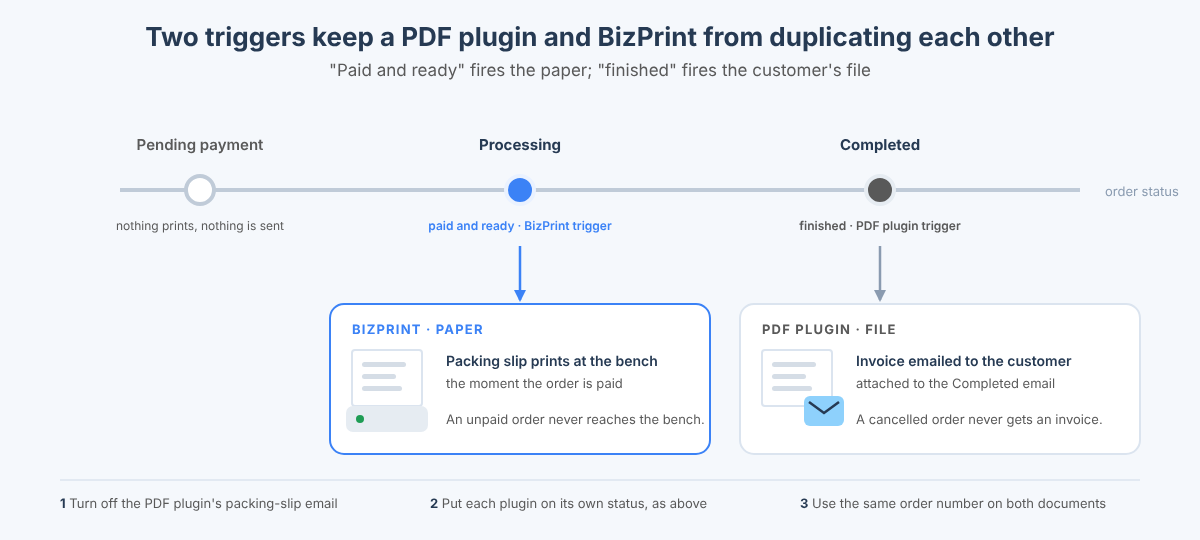
You pair them by letting the PDF plugin own every document that travels as a file and BizPrint own every document that has to exist on paper, and you configure each so neither duplicates the other. This is the most common WooCommerce setup we see, and the two plugins do not conflict because they read the same order and never write to it.
| Document | Who produces it | Trigger | Where it goes |
|---|---|---|---|
| Customer invoice | PDF plugin (WP Overnight, WebToffee, Acowebs, Challan or YITH) | Attached to the Completed or Processing email | Customer’s inbox, My Account, your records |
| Packing slip | BizPrint | Order reaches Processing (or “Ready to pack”) | Printer at the packing bench |
| Pick list | BizPrint | Same trigger, pick-list template | Printer in the stockroom, or the same bench |
| Kitchen ticket or label | BizPrint | Processing, routed by product category | Kitchen or label printer |
| Credit note / proforma | PDF plugin (paid tier) | Refund or manual | Customer’s inbox |
| Paper invoice for the parcel | BizPrint invoice template | Completed, or the same trigger as the slip | Packing bench |
Three settings keep the pairing clean. Turn off the PDF plugin’s packing-slip email if it has one, so the customer gets the invoice and not an operational document. Set BizPrint’s trigger to the status that means “paid and ready”, and the PDF invoice to the status that means “finished”, so the bench never prints an unpaid order and the customer never gets an invoice for a cancelled one. And if the PDF plugin numbers invoices sequentially, use the same order number on the BizPrint template so a printed slip and an emailed invoice can be matched at a glance. Stores that later want to print from a custom app or let an AI agent print a slip when it closes an order use the same BizPrint account through the Print API and the MCP server, which is the part a PDF plugin can never grow into.
When don’t you need a WooCommerce packing slip or invoice plugin?
You don’t need a plugin when the order email, the browser’s print dialog or WooCommerce’s own receipt output already does the job, which is true for more stores than the plugin market suggests. Three cases:
- You fulfil a handful of orders a day from the admin. Every WooCommerce order page prints from the browser (Ctrl+P or Cmd+P) with the line items, addresses and totals, and that printout works as a packing slip. It carries no logo or numbering, and it needs a person at the screen, but it costs nothing.
- Your customers only need proof of purchase. The order confirmation email WooCommerce already sends is a valid receipt in most jurisdictions, and the order details page in My Account is always available to the customer. Add a PDF plugin only when a customer or an accountant asks for a numbered invoice file.
- You print receipts from the WooCommerce mobile app. Since WooCommerce 8.7, core includes a receipt rendering engine that produces an HTML receipt for an order through the REST API (
/wc/v3/orders/<id>/receipt), used by the WooCommerce mobile apps to print receipts for in-person orders. It is a receipt, not an invoice or packing slip, and there is no button for it in wp-admin, but if that is all you print, you need nothing else.
You need a plugin the moment the document needs your branding, a sequence number, tax formatting, a file in the customer’s inbox, or printing without a person present. The first four are PDF-plugin jobs; the last is BizPrint’s, and for the printer side of that decision, including which thermal and label printers work, see WooCommerce Thermal Printer Setup: ESC/POS and StarPRNT and the existing WooCommerce receipt printing guide.
Frequently asked questions
Is a packing slip considered an invoice?
No. A packing slip lists the contents of a shipment for the packer and the customer and usually shows no prices; an invoice is the financial record of the sale with totals, tax and an invoice number. Most WooCommerce plugins generate both from the same order, but they are separate documents with separate jobs. See packing slip vs invoice.
How do I generate a packing slip in WooCommerce?
Install a packing slip plugin, because WooCommerce has no packing slip of its own. With the free PDF Invoices & Packing Slips for WooCommerce plugin, enable the packing slip under its Documents settings, then download it from the order page or generate several at once from the Orders list. With BizPrint, choose a packing-slip template for a printer and the slip prints automatically when the order reaches the status you set.
How do I print out a packing slip?
From the WooCommerce Orders list: tick the orders, pick the plugin’s print or PDF action from Bulk actions, and print the result from the browser. With BizPrint there is no browser step: the slip prints at the bench when the order is paid, or you choose “Print” from Bulk actions and pick the print station to clear a backlog.
What is the best free WooCommerce invoice plugin?
PDF Invoices & Packing Slips for WooCommerce by WP Overnight. Its free version attaches a PDF or XML invoice to order emails, numbers invoices sequentially, generates packing slips in bulk and lets customers download invoices from My Account, and it is the most widely installed and most regularly updated plugin in this category. WebToffee’s free plugin is the alternative if you also need delivery notes and labels.
Does WooCommerce have a built-in invoice or packing slip?
No. WooCommerce sends order emails and shows an order page, both of which can be printed from the browser, and since version 8.7 it can render a receipt through the REST API for the mobile apps, but it does not produce an invoice document or a packing slip. Any numbered, branded invoice or packing slip comes from a plugin.
Can WooCommerce print packing slips automatically?
Yes, with a plugin that connects to a printer rather than one that generates PDFs. BizPrint Print Manager for WooCommerce prints a packing slip the moment an order reaches a chosen status, to any printer connected to a print station, with no browser involved. PDF plugins can email a document automatically but cannot print it without a separate PrintNode-based extension and a desktop client.
How much do WooCommerce PDF invoice plugins cost?
The core plugins from WP Overnight, WebToffee, Challan and Acowebs are free, and their paid tiers for one site were $49 to $79 a year (WP Overnight’s Professional extension is €69) when checked in November 2026; SkyVerge’s Marketplace extension is $79 a year with no free version, and YITH sells an annual licence. BizPrint’s plugin is free and the service is billed per print job from the Plus plan, with 25 free print jobs to start; current plans are on the pricing page.
Can I use a PDF invoice plugin and BizPrint together?
Yes, and it is the recommended setup when you need both an emailed invoice and a printed packing slip. The PDF plugin attaches the invoice to the customer email; BizPrint prints the packing slip, pick list or kitchen ticket on the order status you choose. They read the same order and do not interfere with each other.
Print the slip, email the invoice, stop clicking Print
Pick the PDF plugin that fits your documents, then let BizPrint handle the paper: install the free Print Manager plugin, connect a printer, set the trigger, and your packing slips print themselves from the next order. Every account starts with 25 free print jobs and no card.
